
Bushnell LPi Simulator Bundle Review:
We just set up the Bushnell LPi Simulator Bundle in our indoor space. Honestly, it's a strong pick for practicing golf at home without dropping a fortune on a custom build.
This package comes with the LPi launch monitor, a 1080p projector, an 8'6"×10' steel enclosure and screen, side nets, and a 5'x5' turf mat. Everything shows up together, so you don't have to chase down compatible parts.
The setup process was quick. We had it running in about five minutes—just placed the launch monitor under the hitting area and hooked it up to our gaming PC.
The LPi works in different lighting conditions, which is a relief since our practice space isn't exactly a photography studio.
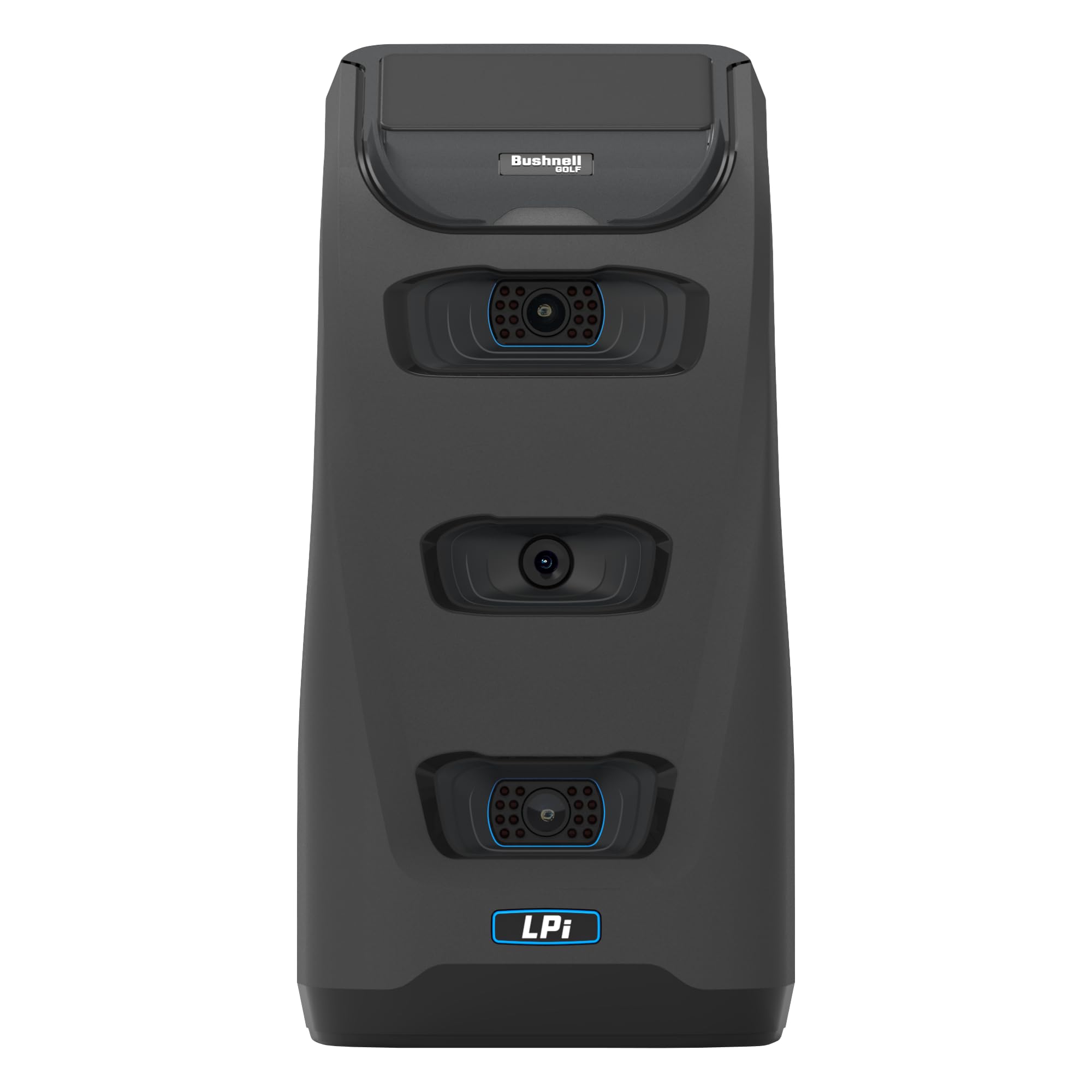
The accuracy feels solid for indoor practice. The hitting zone is about 7×10 inches, so you get a little more room for error compared to monitors that demand perfect ball placement.
We saw the ball and club data stay consistent across sessions, which helps track real improvement instead of second-guessing the numbers.
The bundle gives you a three-month FSX Play Gold subscription with access to 25 courses. The graphics run on Unity and look clean on the projector.
You can also add third-party software like GSPro to get more course options, and you don't need extra hardware to do so.
The enclosure and screen handle impact just fine. We've hit hundreds of shots into it without any issues.
The side nets offer extra protection, which eases the mind when you're swinging indoors. The turf mat feels decent and holds up to regular use without falling apart.
The main catch? You need a gaming PC to run the software, and that's not included. The projector does the job but isn't the brightest, so a darker room helps with visibility.
The launch monitor weighs just over 13 pounds, so you can move it if needed.
Click here to get the Bushnell LPi Simulator Bundle and start improving your game indoors.
Overview of the Bushnell LPi Simulator Bundle
We set up this indoor golf system and found it really does deliver on its promise of being all-in-one. You get the LPi launch monitor, a 1080p projector, an 8'6"×10' steel enclosure with impact screen, side nets, and a 5'x5' turf mat.
What stood out was how fast we got it running. Setup took less than five minutes after assembling the frame.
We put the LPi under the hitting area, plugged it into our gaming PC, and started swinging. The system comes with three months of FSX Play "Gold" access, so you get 25 courses to play right away.
It also works with third-party software like GSPro if you want more options down the line. The wider hitting zone—about 7×10 inches—made it easier to get consistent reads, unlike systems that require laser-precise ball placement.
For the price, this bundle removes the guesswork of buying parts separately.
Key Features
Tour-Validated Indoor Accuracy
We think the LPi's precision is its biggest selling point. The launch monitor kept tracking ball and club data consistently through our sessions, no matter the lighting.
You can practice in a basement or garage without worrying about sunlight messing things up. The unit fits well in tight spaces, which is crucial if you don't have a ton of room.
We didn't run into the tracking issues that crop up with other indoor systems when the hitting zone gets cramped.
Complete All-in-One Simulator Kit
This bundle really covers everything. We got the LPi launch monitor, 1080p projector, an 8'6" by 10' steel frame enclosure, a high-impact screen, triangular side nets, and a 5'x5' turf mat.
Having all these pieces together saves the headache of finding compatible parts. The enclosure provides enough room for most swings, and the steel frame remains stable during use.
The mat is decent for practice, though serious players may want to upgrade eventually. One downside: the whole setup is big. You'll need to dedicate some space, and moving it once it's up isn't easy.
Seamless and Rapid Setup
We had the system running in about five minutes—after assembly. The LPi only needs a hitting zone of about 7 x 10 inches, which works in most indoor spaces.
The enclosure and screen assembly takes longer, so plan on spending a few hours building and positioning everything. Once that's done, setting up the launch monitor is simple.
The quick response time between shots keeps practice flowing. We didn't run into lag or constant recalibration between swings.
FSX Play Gold Subscription Access
The bundle gives you three months of FSX Play Gold. This software runs on Unity and gives you 25 golf courses with realistic visuals.
We liked having the option to add third-party software like GSPro or FSX 2020. You're not locked into just one ecosystem if you want more course options or features later.
The Unity graphics look good on the 1080p projector, though they aren't as high-resolution as premium systems. For the price, the visuals are solid. Just remember, you'll need to pay for the subscription after the first 3 months to keep using FSX Play Gold.
Pros and Cons
Pros
After setting up the bundle, we found it straightforward. The whole system came together in less than five minutes—way less stressful than expected.
Everything for indoor golf arrives in one box, so no scrambling for separate parts. The accuracy impressed us. The LPi tracked our shots consistently, even when the lighting changed.
We could practice at any time of day without worrying about the sun or overhead lights messing with the readings. The hitting zone worked well even in our limited space.
Having the FSX Play subscription included was a nice touch. The graphics looked good, and the 25 courses gave us plenty of variety. The option to connect other software programs lets us expand later if we want.
The enclosure felt sturdy. The steel frame and impact screen handled our full swings, and the side nets kept stray balls from leaving the court. The turf mat provided a decent surface for hitting.
Cons
The three-month subscription goes by fast. After that, you'll need to pay for continued access to the simulation software, which adds to the long-term cost.
The 1080p projector is fine, but it's not the sharpest on the market. It works for practice, but we noticed some limitations in image quality for detailed course views.
Storage became a problem for us. The 8'6"×10' enclosure eats up a lot of space, and breaking it down between uses isn't practical. We had to commit a whole room or garage area to the setup.
The mat felt basic compared to premium options. After long sessions, we felt more impact on our joints than we'd like.
Customer Reviews
We couldn't find any customer reviews for this bundle yet. Looks like it's a new product and hasn't gathered much buyer feedback.
Without reviews, we can't share insights about real-world issues or long-term durability from other golfers. We also don't have info on common setup challenges or how well the included parts work together in actual homes.
If you're interested, check back for customer feedback. First-hand experiences from other buyers can reveal important details about accuracy, ease of installation, and overall satisfaction—stuff you won't get from specs alone.
Realism and Immersive Golf Experience
After setting up the system and taking our first swings, we saw the visuals hold up pretty well for practice. The 1080p projector gives clear images on the screen, and the FSX Play software creates realistic course environments that are engaging enough to keep you interested.
The turf mat provides solid feedback under your feet and club. Ball flight data is displayed on the screen without noticeable lag, helping maintain the feel of real golf.
The 8'6"×10' enclosure with side nets creates a contained space that blocks out distractions. The graphics won't match high-end commercial simulators, though.
The FSX Play subscription comes with 25 courses with decent detail, but some textures look a little flat compared to pricier options. The wide hitting zone meant we didn't have to fuss over ball placement like with other launch monitors.
Setup and Usability
Getting this simulator up and running took us less than an hour, including assembling the steel frame enclosure. The instructions were clear enough, so we didn't have to backtrack or redo steps.
We mounted the projector, hung the impact screen, and positioned the LPi unit without much trouble. The hitting zone is compact at about 7 by 10 inches, so you need to be mindful of ball placement at first.
Once we got used to it, the system responded quickly to each shot. The interface connected smoothly to our devices, and the ambient lighting didn't affect the readings.
The turf mat felt solid, though it's important to align everything for consistent tracking. We were practicing within minutes of finishing the physical setup.
Frequently Asked Questions
What features of the Bushnell LPi Simulator Bundle stand out in reviews?
The wide hitting area gets a lot of attention. At about 7x10 inches, it gives you more room than launch monitors that need precise ball placement, making practice less frustrating.
The all-in-one package makes things easier. Everything arrives together—the launch monitor, projector, enclosure, screen, side nets, and turf mat. We found this takes the stress out of buying parts from different sellers and hoping they work together.
The quick setup time is another highlight. We had the system ready in under five minutes, which is fast for a full simulator. The LPi just sits under your hitting zone and pairs with a gaming PC—no complicated steps.
How does the accuracy of the Bushnell LPi Launch Monitor compare to other models?
The LPi uses the same tech found in Bushnell's tour-level systems. It captures both ball and club data with consistent precision, which puts it ahead of budget options that only track ball flight.
We found it worked reliably in our indoor space and didn't need perfect lighting. Other launch monitors in this price range often struggle with consistency indoors.
The LPi handles small hitting zones better than many competitors, giving us repeatable data shot after shot. The readings matched our expectations based on our outdoor performance.
High-end models like Trackman still offer more data and a bit better precision, but for indoor practice, the LPi delivers accuracy that's good enough for great improvement—without the sky-high price tag.
What are the benefits and drawbacks of the Bushnell Launch Pro subscription?
The bundle comes with three months of FSX Play Gold. You get access to 25 courses right away, all with graphics built on the Unity engine.
We thought the visuals looked sharp. Gameplay felt smooth enough for regular practice.
Benefits:
- Immediate access to quality courses
- Option to add third-party software like GSPro or FSX 2020
- No extra hardware needed for software compatibility
Drawbacks:
- Subscription ends after three months
- Ongoing costs stack up if you want to keep FSX Play
- Some competitors offer longer trial periods
Once the trial ends, you’ll have to decide if FSX Play is worth the subscription. At least the hardware works with several simulation programs, so you’re not stuck with just one option.
How do users rate the performance of the Bushnell LPi Simulator Bundle for indoor golf?
The system works well for year-round indoor practice. We set it up in a typical garage and didn’t run into space issues.
The enclosure is 8'6" tall by 10' wide. That fits most homes with standard ceilings.
The high-impact screen handled repeated shots, even mishits. Side nets did a good job catching stray balls and kept the area safe.
The turf mat felt pretty realistic underfoot. After heavy use, it barely showed any wear.
We noticed a quick response time during testing. The monitor picked up shots fast, with hardly any lag between swing and what you see on screen.
That’s huge for keeping a natural practice rhythm. Indoor lighting didn’t mess with performance, either.
We practiced at different times of day without messing with settings or worrying about shadows. That’s a relief compared to some camera-based systems.
What is the cost-benefit analysis of investing in a Bushnell LPi Simulator Bundle?
The bundle costs $4,999 for a full simulator setup. Building something similar piece by piece would take more time and money, honestly.
Cost Breakdown:
- Buying the complete setup saves money over individual parts
- Avoids paying driving range fees during bad weather
- No monthly golf facility membership needed for practice
If you practice often, the value adds up fast. Range sessions get expensive, especially in winter when you might have to drive farther for indoor spots.
We figured you’d break even in about 18-24 months compared to regular range fees. The system actually helps improve real skills, not just provide entertainment.
Having accurate data every day lets you work on specific issues without booking lessons or driving to the range. Maintenance costs stay low, too.
The one-year warranty covers defects. There aren’t any consumable parts to replace often, except eventually the mat will wear out.
Can the Bushnell LPi compete with high-end simulators in terms of functionality and reliability?
The LPi delivers solid performance, but it doesn't quite reach the level of true high-end systems in every area. I found it reliable for daily practice and accurate enough to make real swing changes.
It tracks the metrics that actually matter—ball speed, launch angle, spin rates, and club data. That's what most golfers are after, right?
High-end simulators like Trackman or Full Swing dig deeper with club path data and advanced analytics. Of course, they also cost five to ten times as much as this bundle.
For most serious amateurs, I just don’t see how that extra detail justifies such a massive price difference. Maybe if you’re a touring pro, but not for the rest of us.
Bushnell’s reputation for reliability holds up here. The system ran smoothly across hundreds of shots, with no crashes or annoying calibration issues.
The steel-framed enclosure feels sturdy enough to last for years. I didn’t worry about durability at all.
The functionality covers what you actually need for real practice. Shot tracer, course play, practice modes, and third-party software compatibility keep sessions interesting.
Honestly, I never felt limited by missing features during normal use. For most golfers, it’s got you covered.

DISCLAIMER
This document is provided for general information purposes only and should not be relied upon as providing legal advice, technical, or specific operational guidance to the reader, whether as to the practices described in the document or the applicable legal requirements and regulations. progolfinsider.com expressly disclaims any responsibility for liability arising from or related to the use or misuse of any information in this document.